Wednesday, October 28, 2009

WoW: Recent Happenings

Occasionally I'm struck with an urge to chronicle the goings-on of a certain aspect of my time/space/etc. Today I had the urge to write about how my WoW (World of Warcraft) characters are doing. Since I've never done this before, it might be a good idea to mention all the characters, at least for this first time.

Quackingbob( 80 Human Warlock Destruction )

Bob was gearing up steadily. He got the Tier 8 chest piece, which really helped his DPS. He can get about 3k+ on heroic target dummies. Since Hallow's End started up he's been shelved a bit. He was able to Trick-or-Treat his way to getting the cloth helm but thats about all. He needs to run a bunch of Heroics for more Emblems of Conquest. Next up in line is the T8 head piece, some decent bracers and probably the spellslinger slippers.

On the AH side Bob's been buying cheap greens to DE and sell the mats on the AH. The money has been steady, so that's nice. The bag market is virtually dead, with netherweave cloth costing 104%+ PCT, its hard to get enough cloth to make bags in any substantial quantity. I try to do the Ebon/Spellweave and Mooncloth transmutes on every cooldown. They are also currently stocked up in the guild bank.

New development, took Bob back into Heroic: Trial of the Champion. The group was pretty good, Reminome the Gnome Mage ( who's DPS is about the same level as me in this dungeon), a blue-geared Pally tank and a decent druid healer and dps warrior. We had an early wipe, which was partly my fault for pulling aggro. We were able to finish the dungeon and I got my Boots of the Crackling Flame. Remi released right before the headless horseman went down and couldn't roll on the boots.

Hooff ( 80 Draenai Paladin Holy/Retribution )

After some random luck with the Hallow's End event, Hooff was able to get the two hardest parts of the achievement pretty easily. He got the Hallowed Helm and Sinister Squashling. Yesterday I finished the achievement up and now Hooff is known as Hooff the Hallowed. Fitting for a Paladin I think.

As for Hooff's gear, his DPS set is still much better than his healing. I want to get him the new t8 helm, but his current helm Spiked Titansteel Helm has so much hit that it would be hard to recoup that lost hit through gems. Maybe I'll wait until I can get both the t8 helm and chest, to make the re-gemming expense worth it.

His healing set still requires some work. He needs some new bracers, he's currently wearing some leather piece from Heroic Culling of Stratholme, and some a new ring ( current one is also from HCoS). Its much easier for me to chain heroics with Hooff as healing, since healers are much more in demand.

Waash ( 75 Night Elf Druid Bear/Cat )

Wash is 75, and has the Hallowed title. Him and Zoee were basically at the same point but Casey hasn't played in a while. In a single run he was able to get both the Hallowed Helm and Sinister Squashling.

I recently respec'd his Cat DPS tree to something more raid worthy. Some theorycrafting and EJ research got me a decent rotation. Its pretty complicated and takes some getting used to. I think its almost as complicated as the 3.0 Affliction Warlock "rotation" back when Affliction was the go-to raiding spec. At my best Waash can put out about 900 DPS on the Heroic target dummy. At 75 that's not terrible.

Waash's tanking spec and gear is mostly the same. A bit of EJ research shows that I should probably be using Maul more, which will be a pain. I'll probably have to respec his tanking tree again when we reach 80, whenever that is.

Waash has been steadily transmuting epic gems, I've got a proc here and there. I haven't been selling the gems lately. I'm trying to stock up so that I can get them cut and used for when my toons get some really good gear. His Alchemy is completely Maxed out while is Inscription is at 446/450. At this point the Major Inscription research is green and skill-ups are few and far between. I'm starting to try to get into the glyph business. Yesterday I spent about 400g on herbs, milled them for inks and made every glyph I could that required Ink of the Sea. I'll see how lucrative the glyph market really is for me. Looking at the prices they're anywhere from 30g to 4g a glyph. The epic Off-hands seem to sell pretty well, so I should be able to keep making those.

Hotplate ( 71 Human Death Knight Blood DPS )

Hotplate got some leveling time recently, and made it up to 71, almost 72. She's currently questing in Dragonblight, near Winterguarde Keep. I was able to get her Tidebreaker Trident from the Winterfin Murlocs, this replaced the venerable Axe of Frozen Death the Trident has slightly better stats and was super easy to acquire that it seemed worth it. Plus the animation speed of the Trident seems faster than the Axe so it gives her a more finessed effect.

Hotplate's mining is coming along nicely, she has a nice stockpile of Cobalt Ore. Her Jewelcrafting on the other hand has stagnated at 225. JC is just so expensive to level that I'm not sure its worth continuing. It would be nice to cut my own gems and have some Dragon's Tears for Hotplate but we'll see. Either way she has a nice stockpile of ore that can be prospected. Having the Tome of Cold Weather Flying has really helped to speed up leveling. I'm cutting my travel time by at least half in comparison to Waash. It also helps with being able to collect mining nodes as I go along.

I'm debating whether to get Hotplate dual-spec. If I bought dual-spec for her, her other spec would probably be tank. I'm not sure I like Death Knight tanking, of course I've never done death knight tanking either. One issue would be that Waash is supposed to be my tanking toon. But with the speed by which he's leveling I doubt he'd be 80 by the time the next expansion comes out. Also Waash has the advantage that he doesn't need to hit the defense cap. He's already un-crittable from his talents. Still, it would be a fun sight to see little Hotplate tanking a 10 foot monster.

Huntry ( 21 Draenei Hunter Beast Master )

Huntry has been converted into a glyph merchant lately. I use her to post my glyphs and run to/from the Ironforge bank. The main reason I haven't been leveling her is time, as in I don't have any. With two toons so close to 80, and two that are gearing up, I just don't have time to really level yet another toon. Though with Casey creating her Pally ( Zoeepal ), if she can get that to 21/22 then I might quest with her.

I did level Huntry to 21 so that she can get her mount, it makes it easier to get from the bank to the AH. Though with Aspect of the Cheetah, thats just fast enough for me not to bother with mounting up.

Lowbies/Assorted:
Quackbank ( 4 Human Rogue )

My banking alt, she's been with me from the very beginning. Nothing new with her, still at level 4 or 5. I did get her a spiffy Noble's Monocle and a Simple Dress. This fits in with the story that she's "retired" from her Rogue ways to live the simpler life of Banker/Merchant. That, plus I had an extra one lying around when I was leveling Bob's tailoring.

I did move her from her cozy home in Stormwind to the more exotic Ironforge, mainly because the AH and bank are a straight shot from each other.

Tempered ( 17 Orc Warrior )

Nothing new to report here, I've trick-or-treated on him once or twice, but nothing else.

Classy ( 17 Blood Elf Rogue )

Same here, nothing really to report. I do notice that people /flirt with this character way more than any other toon ( even the girls ).

Monday, October 05, 2009

CentOS and RHEL

This might be plainly obvious to some people but if you need a package for CentOS, if you can't find a specific CentOS package ( which you probably won't). Grab the corresponding RHEL package. For example if you need subversion 1.5.5 for CentOS 5.3, grab an rpm for RHEL 5.3.

Good thing about RHEL packages, the dependencies are usually in the same folder.

For example, I needed svn 1.5.5 for CentOS 5.3

Grabbed the subversion 1.5.5 package from:

http://the.earth.li/pub/subversion/summersoft.fay.ar.us/pub/subversion/latest/1.5.5/rhel5/i386/

Get the RHEL 5.3 package. Subversion also needs an updated neon package, which is nicely included in the link.

rpm -Uvh the neon package then the subversion package.

-U means upgrade.

Tuesday, March 10, 2009

Howto: Fix a 2 drive failure in a RAID 5 mdadm array

Problem:

Somehow 2 of your drives have been marked as "faulty" by mdadm at the same time. This happened to me because the SATA controller card they were both hooked up to got confused and stuttered. Output should look something like this:

$ sudo mdadm --detail /dev/sda1

Update Time : Fri Feb 6 08:28:55 2009
State : clean
Active Devices : 2
Working Devices : 2
Failed Devices : 2
Spare Devices : 0
Checksum : 50c18fe4 - correct
Events : 0.487370

Layout : left-symmetric
Chunk Size : 64K

Number Major Minor RaidDevice State
this 0 8 1 0 active sync /dev/sda1

0 0 8 1 0 active sync /dev/sda1
1 1 8 17 1 active sync /dev/sdb1
2 2 0 0 2 faulty removed
3 3 0 0 3 faulty removed


As you can the server thinks that raid device 2 and 3 were faulty and thus removed from the array. Since this is a RAID5, 2 faults is 1 fault too many and your data is in jeopardy.

At this point you need to be relatively sure that these at least one ( preferably both ) drives still have the valid data on it. If this is true then go ahead and issue this command:

sudo mdadm --assemble --force /dev/md0 /dev/sdb1 /dev/sdc1 /dev/sdd1 /dev/sde1

Note that the order of the drives must be exactly the same as they were when you first created the array. This information is available by issuing the command used to get the previous output.

Thats the best case scenario.

Sunday, January 25, 2009

RAID5 Fun

After taking a very long haitus from writing this blog I've come back to relate my RAID5 expansion tale.

Background:

Last year ( June or July I think ). A few of us at (then) work were kicking around the idea of creating dedicated file servers. I have been wanting to create a dedicated NAS+RAID setup for some time. The feeling gets stronger every time I lose a crap-load of data when an HD blows up. We found a really good case on sale at newegg and the buying spree starts. The case, an Antec 300 would do well because of the huge 120MM fans in the front. These are required with the amount of drives I want to eventually have. Fast forward to the end, I turned my old 1.3Ghz Athlon media center into a file server. Current stats are:

1.3Ghz Athlon T-Bird
768MB SDRAM ( A lot for a computer of this age and RAM type ).
1.5TB of RAID5 space ( 3x750GB drives)

Current:

I filled up that 1.5TB pretty quickly. I finally broke down and bought a 4th 750GB drive this weekend. One of great things about software RAID is that you can add drives to it WITHOUT having to reformat ( or technically even unmount the filesystem). By adding a fourth drive, the space efficiency of RAID5 really starts to shine. From 4x750GB drives, I'll have 2.2TB of usable space. Adding the drive to the array was as simple as installing the drive, creating a LINUX RAID paritition ( 0xFD type), and adding it to the raid.

First you add the new drive as a spare drive:

sudo mdadm --add /dev/md0 /dev/sdd1

Then GROW the raid over the new drive

sudo mdadm --grow /dev/md0 --raid-devices=4

This takes a LONG time, depending on the host computer, amount of data, etc.. My 95% full 1.5TB is currently at 1.4% with 9186mins left to go. Yes thats about 6.5 days. So my poor little computer is gonna chug for almost a solid week to grow this RAID.

I should probably explain that this is not typical and that quite a few factors are contributing to the long processing time.

1. Slow processor: While resync'ing the raid is not computationally difficult, because of the slow processor, other processes are backing up and is not helping the situation.
2. Huge amount of data: Because there is just sooo much data to move around, the sync is going to take a while.
3. Drive layout: The layout of my RAID is ... unique. Because this is a very old motherboard, with NO SATA slots ( and all 4d drives being SATA drives), SATA-PCI cards were used, 2 in fact. These two cards are both on the PCI bus, which makes intra-RAID communication slow. This quickly saturates the bus. In fact I'm only getting about 1322K/sec transfer between drives. Thats 1.5MB/s from drives that could theoretically handle 70-80MB/s easy.
4. PCI network card: As if the PCI bus was not saturated enough, this board did not come with on-board LAN. I had to put in a PCI NIC. This further slows the sync because now all network traffic is fighting for bandwidth with the hd transfers.

Edit: I forgot to mention that after the restructuring of the computer, its now called downy. Yes, there is an uppy, its the P2 300MHz laptop that Mike gave me. I was using it as a spare terminal at Space Micro. Since I've changed jobs, and Sony gave me plenty of monitors, uppy is sitting in its dock, waiting to be used again.

Sunday, March 04, 2007

Wii have landed...

Yes, thats' right. I broke down and bought a Wii. I figured that it would be a good way for me to be more active when I get home from work. Exercising is out because I'm already so tired after work that the prospect of working out goes right out the window. With the Wii I'm up and about, but its still something fun I can look forward to.

On Saturday February 24th, I decided that I wanted a Wii and started to look around. I called a few stores in Riverside, but none were in stock. I found out that all Circuit Cities were scheduled to release Wii's the next day. I figured that I could get there and have a good chance of getting one. Circuit City opened at 10am, and I arrived around 10:30. When I asked the lady at the register, she almost laughed at me. It turned out all the Wiis were sold before they even opened.

I checked all the electronics places around, Best Buy, Target, and Gamestop. There was none to be had. I got back to San Diego at around 8:30. On my way back I passed by Best Buy and decided to check it out. I wasn't even sure if they were still open. They were and I asked one of the sales guys if they had any more Wiis. He said they had some and to talk to this other associate. I talked to the associate who wasn't very helpful. I stayed around, waiting for him to come back so I could speak with him again. After a few minutes I turned around and saw a demonstration area with some Nintendo employees. I asked if they had any more Wiis, and the handed me a ticket! I told them that I was ready to pay for it and the gentleman escorted me to the checkout.

At the checkout I spoke with the cashier and it turned out they were having some event. I ended up getting over 700+ rewards points for my purchase, instead of the normal 250 ( the dollar value of the Wii). I brought the Wii home and prompty figured out that I HAD NO TV. Being the impatient bastard that I am, I hooked it up to the only screen I had that could accept the RCA signal... a 10 year old Sony Camcorder. I was able to play WIi Boxing onthis sucker. Yes. I was playing Wii on a 2 INCH screen. Unfortunately I don't have pictures of that.


This is the Wii box. At first it reminded me of an Apple product, with a different color scheme.


Another view of the box.


The Apple influence shows again, as the box is very straight forward to unpack. As if the steps to unpack it were designed.


The contents of the top level. Including the Wiimote, nunchuck, connectors and Wii Sports.


The contents of the bottom level. This includes the Wii itself, stand and power brick.


The Wii itself. Its actually quite tiny. About the size of an external CDRW. I thought the Mac Mini was small.


Another view of the system itself. It functions very well horizontally. I almost prefer it horizontal.


A picture of all the hardware that was included.


Finally a shot of the current setup. I wanted an HDTV, but at this point it really just did not make sense to get one. I instead bought a cheapo 20" Magnavox from Wal-Mart.

BTW the Wii is named Eggs. Don't ask why.

Tuesday, September 19, 2006

Computer Round-Up

Quite a bit has happened to my little farm of computers since I've moved to San Diego. For one all of them are running quite a bit hotter, this is mainly because I've moved from a downstairs apartment up to an upstairs one. This hasn't affected the computers too much, I'm hoping it stays that way.


First of all my main computer:


Friskett is now a 2.3Ghz Athlon64 with 3GB of ram and varying hard drive capacities. I had to scale down the overclock with the new ram. Even the semi-high quality corsair ram I got just couldn't clock high enough.

I resurrected my old parts and its now named "Boba". It breaks the Reboot naming convention, but Casey named it.


It features a 1.3Ghz Athlon Thunderbird with 256MB of ram. As a folding/file server it runs well. I replaced the annoyingly noisy heatsink fan with a much smaller, much weaker, much QUIETER fan. Its the fan that was installed when it was an 800mhz. The temperatures can reach up to 60C on a hot day in full load, but it seems to be fine.

Now for some work machines:

Keyhole


This computer I'm using temporarily for downloading software onto the DSP board i'm working with. My main machine runs linux and XP in VMWARE. That setup did not lend well to my serial communication needs. Thus I had to borrow this machine. While I'm using it I'm folding as well.

hcorelaptop


This is an ancient laptop that we'll be using for our radiation test. Currently I'm trying to get it straightened out, in regards to networking, namely it doesn't have any. Kelly actually has the exact same laptop, in better shape but with much much less ram.

Thursday, April 13, 2006

Matlab7 + AMD A64 = Hours of frustration

After hours and hours of time and countless re-installs I FINALLY got Matlab7 working on an Athlon64 processor. Basically this is the fix:

You have to create a few System Environment Variables.

To create those do this:

1. Right-Click "My Computer"
2. Go to Advanced
3. Go to Environment Variables
4. Click "New" in System Variables

Create these 2 variables:

Variable Value
BLAS_VERSION atlas_Athlon.dll
LANPACK_VERBOSITY 1

That should be it.

Sunday, January 29, 2006

300GB of Segate frustration

My experiences with Seagate have been somewhat poor. I'd like to give them the benefit of the doubt and think of my experiences as abnormal, not representative of what a "normal" user would experience. My first experience with a drive purchased from them was back in 2004. After much searching, I found a 160GB Seagate UATA HD for a good price. I bought the last one Circuit City had in stock and happily took it home. It installed fine and formatted without problems (thought slowly). After a few days I put the drive through its paces, copying multi-gigabyte files to it. I started to get CRC errors. I ran a diagnostic and found that the drive was defective. Back to Circuit City it went.

It's now 2006 and I decided to give Seagate another shot. Bought a 300GB UATA HD from Fry's and installed it. This time I ran the diagnostics PRIOR to formatting or installing any software. It took a few hours but it tested fine. Formatting took all night (it's a 300GB HD after all). That's when the problems started happening.

1. Original XP Pro CD cannot handle hard drives of 127GB or higher. I need at least SP1 for that. I can't find my slipstreammed SP2 so I decide to use my Legit Sp1a CD. That seems to work until the first reboot. Then it errors out with "Error loading Operating System". By this point I'm getting apprehensive about the drive. But since I'd never actually installed XP using that CD before, I chalked it up as a fluke and decided to just create another slipstreammed SP2 CD.

2. Create another SP2 cd. Follow the directions online, burn cd, reboot. Error... Hmmm...

3. Create ANOTHER sp2 cd. Follow the directions online (find the step I skipped over last time), burn cd, reboot. Instal starts.

4. Choose partition, setup copies files, reboot... "Error loading operating system..." Crap.

5. Off to google. Find something about changing the addressing mode from "Auto" to "LBA". Try that and install goes through! (I also found an article that says to NOT use LBA and to use "Large" instead.

Install went off rather uneventfully after that problem. I'm not copying all 80+ gigs of data off my 100GB HD onto the 300GB HD. The 100GB HD will be handed down to my sister to replace her 40GB IBM Deathstar that died recently.

Sunday, November 06, 2005

Quake 4

Wow. Since I got my computer, most games have been no problem. Half-life 2 and even Doom work resonably well at high-quality, using 1280x1024 or sometimes 1024x768 resolutions.

Quake 4 I have to run at 800x600, and I'm thinking of lowering that to 640x480 to get rid of the lag. Yes it's that crazy. When you set it to Ultra Quality, a warning comes up saying that over 500 megs of textures must be loaded and that this setting is not recommended for anyone.

Crazy shit.

Saturday, October 22, 2005

Nerd stuff

Ok.. yeah i'm a nerd. Here are some CPU-Z info from 2 laptops I setup/fixxed for some friends.

First:


This is a celeron 2.2Ghz from a Dell Inspiron 1100. It's not a bad machine for what it needs to do. For day to day tasks in windows, there's enough power to run most of anything you might want to do. It does start showing it's weaknesses if you start running too many programs at once. It only has 256MB of DDR333 so that is a factor. With another 512 stick, this thing should do fine.

Second:


This is a Pentium 4-M 2.0 Ghz from a Toshiba Satellite. This is the mobile version of the Pentium 4, NOT a Pentium M. This is the predecessor to the Pentium M. The performance is about the same as the celeron 2.2. This one had more ram (512) so multitasking was a bit speedier. The laptop itself was rather large, but it was able to take 10+ hours of folding without missing a beat. Another 512 of ram would do well for this machine.

Something to notice is the FSB of both machines. The true FSB is only about a 100Mhz, but being intel chips, the FSB's are quad-pumped for 400Mhz effective Bus. Having never owned a Pentium of these speeds (my fastest Pentium is a 700Mhz P3), I couldn't say how much the slow bus affected overall speed. I know that on my Athlon64, with the integrated memroy controller, the FSB has become less of an issue.

From these shots, the major difference between the two processors is that the P4-M has twice the L2 cache of the celeron 256k vs. 512k. Cache does make a big difference in performance.

Other than that, both processors seem to perform comparitively.

Monday, October 10, 2005

Oh dear lord...

http://hardmac.com/news/2005-10-10/


OSx86 running on 4 physical intel processors. Hyperthreading enabled. That's 8 logical processors..... holy crap.

Thursday, October 06, 2005

Smack that SAS...

After hours upon hours of compiling, updating and otherwise working my laptop into the ground... I have SAS 6.1.0 working under 10.4.

I can't take much of the credit... I followed this and merely adapted it to 10.4 (instead of 10.3 or 10.2 as in the instructions).

Here is how it went:

Download the most up to date version of xmm-newton-sas from here.

There are four files needed:

xmmsas_XXXXXXXX_1832-common-config.tar.gz

xmmsas_XXXXXXXX_1832-common-doc.tar.gz

xmmsas_XXXXXXXX_1832-powerpc-apple-darwin6.8-bin.tar.gz

xmmsas_XXXXXXXX_1832-powerpc-apple-darwin6.8-libextra.tar.gz

The X's are replaced with the date of the most recent build. If you go through the ftp site, the path is pretty simple to follow.

Extract everything to some folder, such as ~/SAS/.

Use the following commands to set your paths:

export SAS_DIR=~/SAS/xmmsas_20041122_1832
export SAS_PATH=$SAS_DIR
. $SAS_DIR/sas-setup.sh
export DYLD_LIBRARY_PATH=$SAS_DIR/libextra:$DYLD_LIBRARY_PATH

replace ~/SAS/ with your path, and xmmsas_blah blah with the version you have.

After you get THAT working... make sure your fink(and X11.app) installation is up to date. If so, get the qt3 package.

sudo fink install qt3

Then go watch a movie. Depending on the state and speed of your system, this could take a while to d/l and compile the necessary packages. On my 867mhz G4 it took roughly 2.5-3 hours.

export DYLD_LIBRARY_PATH=/sw/lib:$DYLD_LIBRARY_PATH

to update tell your SAS installation to use your newly compiled DYLD libraries instead of the older ones that came with sas.

If you get something similar to this error:

dyld: Symbol not found: __cg_jpeg_resync_to_restart .... then do:

sudo fink remove libjpeg.

Updating libtool might help as well (sudo fink update libtool).

Don't ask me WHY removing libjpeg works... I'm not really sure. Hope this helps.

Saturday, October 01, 2005

64-bit Action.

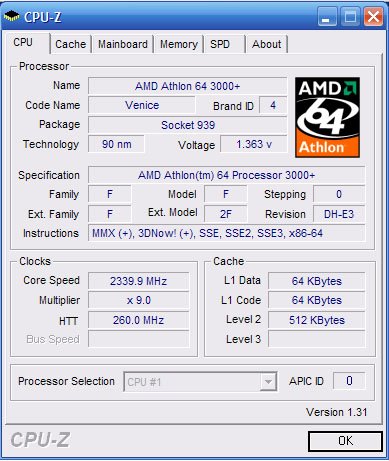
I bit the bullet about 2 weeks ago. I did a major upgrade to my desktop. I purchased a:


Athlon64 3000+ Socket 939 "Venice" Processor


Epox 9NDA3J Motherboard

Total from Newegg: $230 after tax and shipping.

That along with 512 borrowed from Rachelle has given me a very nice desktop to work with. (I recently bought another 512, so that I can return Rachelle's 512 to her next time I'm home).

Pictures of course:


The two boxes, right out of the FedEx packaging.


The contents of the motherboard package.


The motherboard itself. Note that there are a total of 4 DIMM slots, as opposed to the normal 2 or 3 DIMM slots of budget boards. The reason this is worth noting is that when I upgrade ram, i'll be able to merely ADD ram, than having to replace it. Also the board supports Dual-Channel.


The picture of the processor itself. The stock Heatsink/Fan is EXTREMELY Quiet. I love how I can barely hear the system going, and thats only if I don't have any music or anything else going on. Stock the processor runs at 1.8Ghz with a 200Mhz Bus(kinda). Equivalent performance is to a 3.0Ghz Pentium 4, for most tasks.

Stock the system ran a very cool 40C, under full folding load.

UPDATE: I overclocked the system. Its now running at 2.43Ghz with an 270Mhz Bus(kinda). Thats about a 30% overclock. To translate into easier to appreciate terms. I'm getting the equivalent speed to a 3.5-3.7Ghz P4 or a 3500-3700+ Athlon.


The processor is running at a still cool 44C, again, under full load. What used to take 1.5 Hours/frame to fold, now takes roughly 23mins/frame.

Sunday, August 07, 2005

All Natural...

I purchased this Microsoft Natural Keyboard Pro from the UCR Salvage sale for $1 (plus tax). It was pretty filthy when I got it, so I decided to clean it up. Here are some of the pictures from that cleanup. The keyboard was much more complicated than both my Microsoft Keyboard and Logitech Wireless Keyboard.


The photos above are closeups of the dirt in the keyboard. The photos don't do it any justice. This thing was filthy.


These photos are after the cleanup. After the cleanup,the keys feel more spoungy, like they've lost some of their spring. I'm not sure if it's just my imagination, or if the keys aren't quite seated perfectly. But from the layout of the keyboard, I'm not sure how that could happen.

Thursday, June 16, 2005

EMACS

Here are a few emacs and terminal tricks I picked up today.

C- means hold down control and press the next letter. Example C-x means hold down control and press x.

M- means press and release ESC and press the next letter. Example M-x means press ESC then press x. Also on some systems holding down ALT will work also.

For the mac users, ALT=OPTION.

Terminal:

Lock your command prompt: C-s

Unlock your command prompt: C-q

Minimize emacs: C-z (from within emacs)

Restore emacs: fg (type fg into command promt)

Emacs:

Split window horizontally: C-x 2

Split window vertically: C-x 3

Merge back to single window: C-x 1

Close current buffer: C-x 4 0

Open a file in a new window: C-x 4 f filename

More to come later.

Friday, June 10, 2005

New Sunglasses

After 8 loyal years of service, I've retired my perscription sunglasses. They're old and battered but they were reliable.

In it's place I got a pair of Caribbean Sun's from Wal Mart. They were having a package deal and I was able to get the frames, lenses, polarization and labor for $99 total without insurace. Sure beats the $253 an optometrist shop wanted to charge me.

Here are some pictures. YES they were taken by my Nikon Coolpix 3100. A few days ago it decided to start working again.


They're quite a bit larger than my previous pair, which should help with pinching of the ears. Yes, I got a fat head.


Another angle.


It came with a case (huge compared to my Converse case) and a wiping cloth. Wal Mart also threw in a small bottle of cleaning solution.

Im still getting used to the glasses. They're heavier than my old pair, and almost completely eclipse my vision. They're also a different color. Using these indoors will be quite a bit harder than my previous pair (the lenses are much darker).

I think it might have something to do with the polarization, but I can see vivid color patterns in paints and off glass. It's quite strange, it is similar to light being passed through a prism.

Monday, June 06, 2005

OSX to go to Intel

Well it's official, today at the WWDC, Apple CEO Steve Jobs announced that OSX was transitioning to Intel x86 chips. He even did the entire demo using a Powermac running a 3.6ghz Pentium 4. Everything seemed smooth. All the major Apple apps were working fine.

I'm still quite a bit stunned at the prospect of it all.

Pros:

1. Parity in processor speeds. This will finally decide the "which is faster" debate, since OSX and Windows will both be running on the same chips.
2. Economies of scale. Intel makes ALOT of processors. Compared to a G5 processor, an x86 chip will be MUCH cheaper. Does this translate to cheaper system? It's too early to tell.

Cons:
1. Intel hardware. Among the OSX people there's always been a disdain for anything PC (that's where the whole "zealot" name came out of). Pentium 4's have an unbelievably deep pipleline, this is what enables them to run at 3+ GHZ clock speeds. This also means it takes many clock cycles for an instruction to finish, and that branch prediction errors are very costly. How this will affect OSX, is again, too early to tell.

2. Migration: Some software will just not work. Especially some of the "Classic" software that people are using just will not work on Intel hardware. Period. This can also mean that many developers might give up on the platform.

Since everything is so early, there's no way to know how things will play out. But I do know that Apple hardware sales will be down this year.

Thursday, May 19, 2005

Room to expand

Try #2 to write this post: (Much shorter version)

I just bought a SimpleTech 250GB USB2.0/FireWire HD. The specs are as follows:

1 Firewire 1394a port
1 USB2.0 Hi-Speed port
The enclosure itself is a prolific chipset. The internal HD turned out to be a Seagate 250GB
HD with 7200rpm spindle speed and 8MB cache.

The drive as it arrived from UPS (it arrived early in the morning the day after it shipped, but with no tracking number).


The box of the drive itself


The drive itself as packed in the box. The drive was packed pretty well, but I would liked a bit more padding.
The drive is made of metal, which hopefully will help disappate heat. It comes with drive stands and was designed to be upright, but without the feet it's possible to run it horizontally.


The drive came with 2 VERY short USB2.0 and Firewire cables. They are the shortest I've ever seen.


The firewire cord is only about 1 foot long. Which means the drive has to be right next to the laptop, if it has any chance of reaching.


The pictures were taken with my roommates' Sony digicam, as my Nikon is still broken.

So far I've formatted the drive, and have backed up my laptop's internal HD to it. It has about 50GBs of data on the drive currently. I have even been able to test whether the drive boots, good news, it does. I've also run a surface scan using Tech Tool pro, and the drive passed.

The drive itself is quiet, the only noise you can hear is the seek noises. Once in a while, theres' this thrashing sound that's quite a bit louder than normal, but I think it's normal. Hopefully it keeps working well.

Wednesday, April 20, 2005

MSI Radeon 9550 128MB 128-bit

The Radeon arrived today, 2 days ahead of schedule. Compulsory pictures are included. The card arrived at 2:30pm 4/20/05. I beat the FedEx guy home by about 5 mins. I think he was in front of me on the way home, but he had to stop at the UV.


The package itself was very light (only 2 lbs). The retail box itself was packed within.


A picture of the retail box itself, quite tiny.


The back.


The internals. It came with the bare essentials. Card, booklet, drivers.


A picture of the card itself. Notice the MSI heatsink.


A closer view. Excuse the paper towel I used to clean the case before hand.


A picture of both cards installed. I actually had some trouble getting the card installed. It turns out that NVIDIA and ATI do not co-exist very well, atleast their drivers don't. I had to uninstall the NVIDIA drivers before the ATI card could output a signal. Thank goodness my LCD has dual inputs (VGA adn DVI), so I was able to switch between without trading cables.


For comparison, a picture of my Geforce4 MX440SE PCI video card. It has been a loyal work horse for many years. It's time it was retired. From now on it will re-join my 733mhz Dell at home, this should help my mom play her games a little better. The Dell integrated graphics are not cutting it.


A few preliminary tests with Cinebench and 3DMark2001 indicate that the 9550 is performing at rougly twice the level of the GF4. 3DMark2001 scores are in the high 6000s. I have been putting the card through it's paces and it seem to play Homeworld 2 @ 1280x960 with all the graphics turned up, quite well. Later I hope to overclock the card to 9600 or even 9600Pro speeds.

Monday, April 18, 2005

New Purchase

Just purchased this:


It is a MSI Radeon 9550 w/ 128MB of VRAM. It is the normal 9550 with
the 128-bit interface instead of the SE's crippled 64-bit. I ordered
it today, and there seems to be a problem with my address verification.
Hopefully it will be resolved and I can write a review as soon as
I recieve the card and put it through it's paces.

Also from some of the research I've done, depending on your luck you may
be able to overclock it to 9600 or 9600pro speeds. Not bad, $120 performance
from a $60 card.

$60 @ ChiefValue.com